Let us paint a picture that we’ve seen hundreds of times. You start a new project or a new company. You need a way to organize the chaos, so you sign up for Trello and it’s brilliant.
But then, you grow. Suddenly, your team needs to track billable hours. Your sales reps need to email clients directly from their tasks. Your HR department needs an approval workflow for vacation days. Trello, bless its simplicity, begins to buckle. You start duct-taping it together with Zapier, Slack, and expensive third-party plugins.
To understand the core difference between these two platforms, think of this: Trello is a highly efficient digital whiteboard with sticky notes. Bitrix24 is an entire digital office building.
Transitioning from Trello to Bitrix24 isn't just about switching task managers; it’s a fundamental shift from using a single-purpose tool to operating within a unified business workspace. In this guide, we will break down the features, pricing, and the inevitable learning curve of both platforms to help you decide which is right for you.
The Core Philosophy
Trello: The Master of Kanban
Trello was built on one guiding principle: simplicity. It popularized the Kanban methodology for the masses, relying almost entirely on a visual "Board, List, Card" system. It is purposefully stripped down so that absolutely anyone, regardless of their tech-savviness, can look at a board and instantly understand the status of a project.
Bitrix24: The All-in-One Ecosystem
Bitrix24 approaches business software from the exact opposite angle. It believes that data shouldn't live in silos. Task management is just one of over 35 interconnected modules within Bitrix24. When you log in, you aren't just looking at tasks; you have access to a fully integrated CRM, HR management tools, a company Intranet, a Contact Center, and website builders. It is an ecosystem designed to run your entire enterprise.
Task & Project Management
Third-Party Add-Ons vs. Native Power
Because Trello is so streamlined, it relies heavily on "Power-Ups" – third-party integrations –to perform advanced functions. Want a Gantt chart? You'll need a Power-Up. Need to track time? Another Power-Up (and likely another monthly subscription fee).
Bitrix24, on the other hand, provides native power out of the box. Without installing a single plugin, you can view your projects as Kanban boards, Lists, dynamic Calendars, or fully interactive Gantt charts. The tools are built by the same developer, ensuring they talk to each other flawlessly.
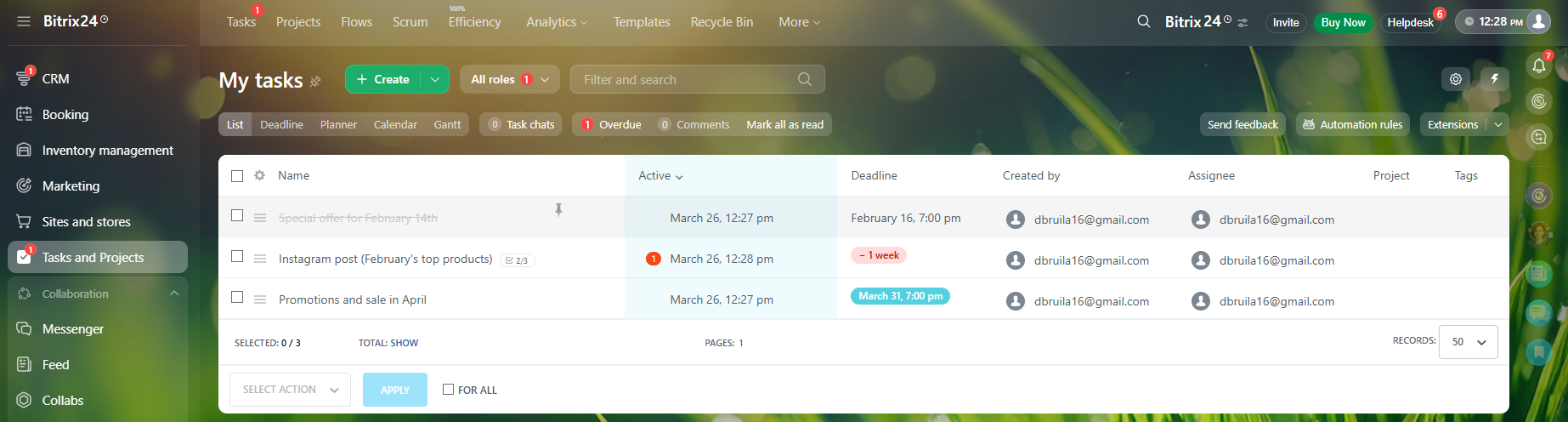
List view of tasks
Advanced Task Delegation in Bitrix24
In Trello, you assign a user to a card. That's about it. Bitrix24 understands that real-world delegation is more complex. It utilizes specific task roles:
Creator – the person who assigned the task.
Responsible Person– the one actively doing the work.
Participants – co-workers assisting the responsible person.
Observers – managers or stakeholders who just need to monitor progress.
Furthermore, Bitrix24 includes native time-tracking and automated employee efficiency scoring, allowing management to see exactly who is performing and who is falling behind.
CRM & Client Management: Tasks vs. Relationships
Why Trello Isn't a CRM
One of the most common mistakes businesses make is trying to "hack" Trello into a CRM. They make a list called "Leads" and use cards for client names. It works for about a month. The limitation is severe: you cannot natively email a client, make a phone call, or generate a quote directly from a Trello card.
Bitrix24’s Built-in CRM Machine
Bitrix24 features an enterprise-grade CRM natively wired into its task manager. It follows a standard, robust pipeline: Leads, Deals, Contacts, and Companies.
The crown jewel here is the "Contact Center." Bitrix24 integrates your business email, VoIP telephony, WhatsApp, Facebook Messenger, and Instagram directly into the client’s CRM file. When a client messages you on WhatsApp, your team can reply directly from inside the Bitrix24 CRM, and the entire conversation is permanently logged in the client's history.
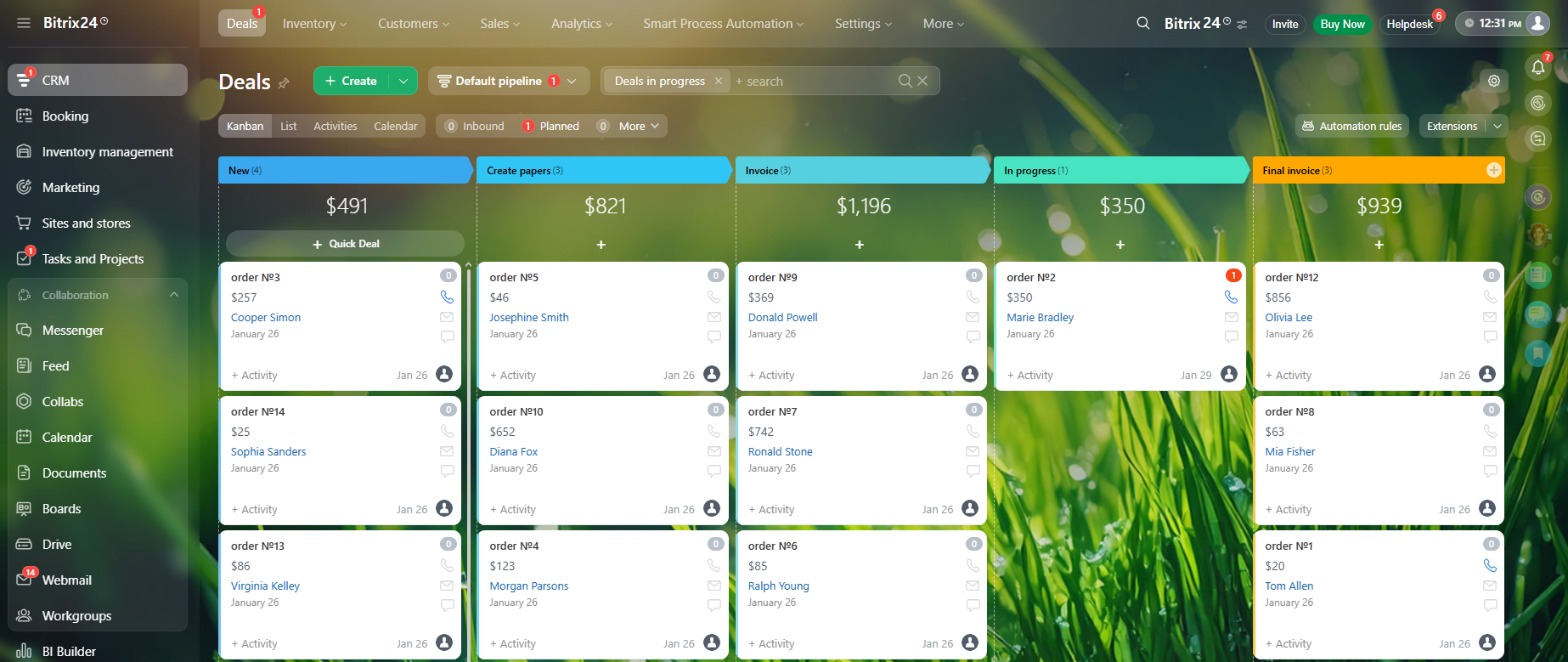
Deals in Bitrix24 CRM
Internal Communication
Siloed Communication in Trello
Communication in Trello is effectively limited to tagging colleagues in the comment section of a card. If you actually need to have a real-time conversation, brainstorm, or host a daily stand-up, your team has to leave Trello and open Slack, MS Teams, or Zoom. This context-switching kills productivity (and requires more paid subscriptions).
Bitrix24’s Unified Comms
Bitrix24 aims to be the only tab you need open. It features a built-in instant messenger for private and group chats, alongside HD video conferencing for up to 48 participants.
Beyond direct messaging, Bitrix24 shines with its "Social Intranet." This functions like a private social network for your company. You get an internal newsfeed for company-wide announcements, polls to gather employee feedback, and "Appreciation Badges" to publicly recognize team members for a job well done.
Automation: Basic Triggers vs. Business Processes
Trello's "Butler"
Trello features an automation bot called "Butler." It is fantastic for basic, linear task automation. For example, you can set a rule that says: When a card is moved to the "Review" list, automatically assign it to Sarah and add a yellow label.
Bitrix24’s Robotic Process Automation (RPA)
While Bitrix24 can handle basic task triggers, its true power lies in cross-departmental Robotic Process Automation (RPA). It allows you to digitize complex, multi-step workflows.
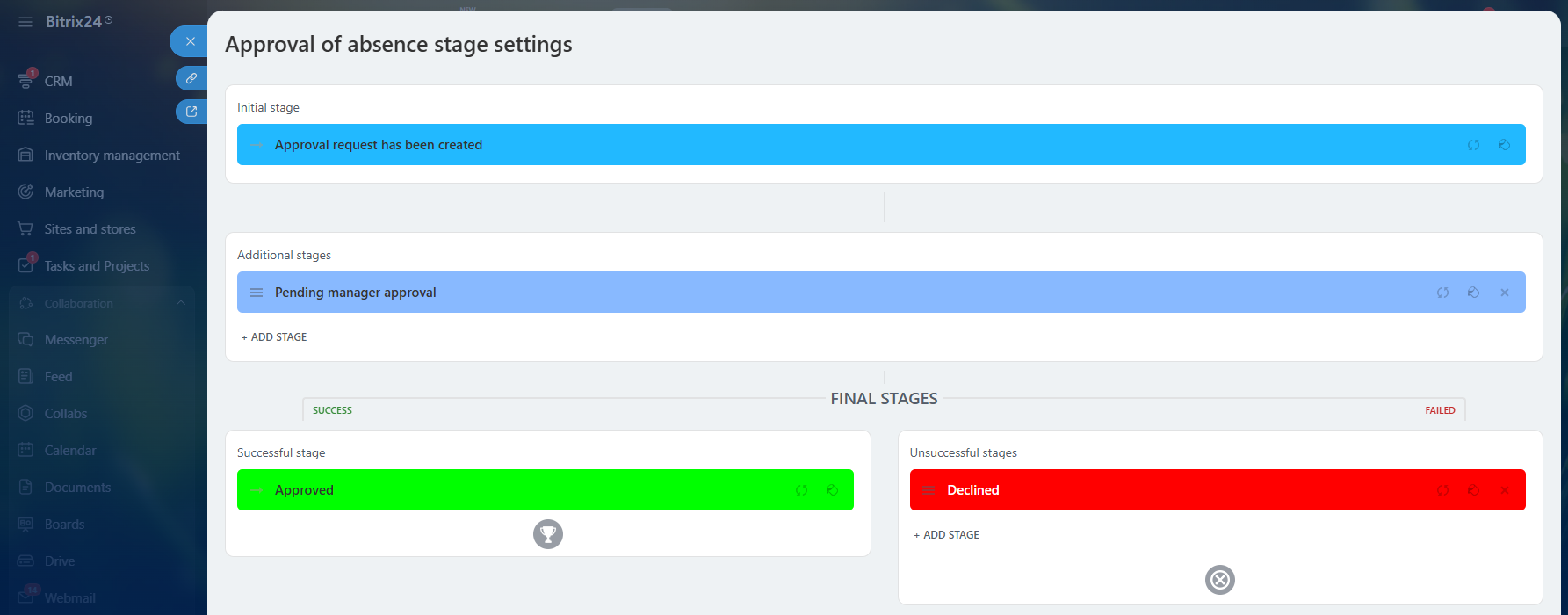
Let's use a real-world example: an employee needs to request time off. In Bitrix24, the employee fills out a simple internal form. The system automatically routes the request to their direct manager for approval. Once approved, Bitrix24 automatically updates the company-wide absence calendar, adjusts the employee's logged vacation hours, and sends a notification directly to the HR and Payroll departments. No emails required.
Robotic automation of the absence approval process in Bitrix24
Pricing Models and Deployment
The "Per User" Trap vs. Flat-Rate Pricing
Trello utilizes a standard Cloud-only SaaS model: you pay a monthly fee per user. If your company scales from 20 to 100 employees, your software bill multiplies by five.
Bitrix24 is famous in the industry for its flat-rate tier pricing. You pay a set monthly price for a bundle of users (e.g., up to 50, up to 100) or a flat rate for unlimited users. As your team grows, your software costs do not skyrocket, making it incredibly financially scalable.
Monthly payment
Plan
Bitrix24
Trello
Basic
12.2$ / user
(61$ / mounth - includes 5 users)
—
Standard
2.48$ / user
(124$ / mounth - includes 50 users)
6$ / user
Premium
2.49$ / user
(249$ / mounth - includes 100 users)
12.5$ / user
Enterprise
from 0.99$ / user
(depending on the number of users)
the final price is set by sales
Annual payment (price per month)
Plan
Bitrix24
Trello
Basic
9.8$ / user
(49$ / mounth - includes 5 users)
—
Standard
1.98$ / user
(99$ / mounth - includes 50 users)
5$ / user
Premium
1.99$ / user
(199$ / mounth - includes 100 users)
10$ / user
Enterprise
from 0.79$ / user
(depending on the number of users)
the final price is set by sales
Free plan \ discounts
Bitrix24
Trello
maximum number of users
unlimited
10 collaborators
trial period
15 days
14 days
discounts
up to 20% for annual payment
for nonprofits and social enterprises
(50-100%)
Furthermore, Trello is exclusively cloud-based. Bitrix24 offers both Cloud and On-Premise deployments. With the On-Premise version, enterprises get access to the open-source code, allowing for infinite customization, custom integrations, and the ability to host the data on their own servers for maximum security and compliance.
The Learning Curve
Let's give credit where it is due: Trello's adoption rate is practically zero-friction. A new hire can master it in minutes.
We must issue a warning about Bitrix24: out of the box, it is incredibly dense. When you first log in, you are greeted by dozens of menus, modules, and settings. It can be overwhelming, and it does require a commitment to training.
How to Succeed with Bitrix24
You don't have to use all 35 modules on day one. The secret to a successful Bitrix24 implementation is customization. Hide the modules you don't need from the left-hand menu. We highly recommend a phased roll-out: start by migrating your team to Bitrix24 Tasks and Chat for the first month. Once they are comfortable, introduce the CRM in month two, and HR automations in month three.
Feature Comparison at a Glance
Before we make our final verdict, here is a quick breakdown of how specific functions align across the two platforms.
Function / Feature
Bitrix24
Trello
Task & Project Management
Kanban Boards
+
+
List / Table View
+
+
Native Gantt Charts
+
—
Native Calendar View
+
+
Native Time Tracking
+
+
Task Dependencies
+
—
Subtasks & Nested Tasks
+
—
Task Roles (Creator, Responsible, Observer)
+
—
Recurring Tasks / Templates
+
—
Native Scrum Workspaces (Sprints, Story Points)
+
—
Employee Workload Management
+
—
Communication & Collaboration
Task/Card Comments & @mentions
+
+
Built-in Instant Messaging (Private & Group Chat)
+
—
Native HD Video Calls & Screen Sharing
+
—
Company Social Intranet & Newsfeed
+
—
Employee Badges & Peer Recognition
+
—
Extranet (External Guest Access for Clients)
+
+
CRM & Sales Management
Lead & Deal Pipeline Management
+
—
Contact & Company Database
+
—
Quotes & Invoicing
+
—
Product Catalog & Inventory Management
+
—
Native Email Marketing & Campaigns
+
—
Online Payment Integrations
+
—
Customer Support & Contact Center
Omnichannel Inbox (WhatsApp, FB, Insta, etc.)
+
—
Native VoIP Telephony Integration
+
—
Call Recording & Routing
+
—
Live Website Chat Widget
+
—
Web Forms / Lead Capture Forms
+
—
Automation & HR
Basic Task Automation (Triggers & Rules)
+
+
Advanced Business Processes (RPA)
+
—
Leave / Vacation Request Workflows
+
—
Clock-in / Clock-out Attendance Tracking
+
—
Visual Company Structure / Org Chart
+
—
Automated Work Reports
+
—
Files, Ecosystem & Deployment
Built-in Cloud Storage (Company Drive)
+
—
Collaborative Online Document Editing
+
—
Built-in Website & Landing Page Builder
+
—
Mobile App (iOS / Android)
+
+
Flat-Rate Pricing (Bundle/Unlimited Users)
+
—
On-Premise Deployment (Self-hosted)
+
—
Open-Source Code Access for Customization
+
—
The Final Verdict
Choosing between Trello and Bitrix24 is rarely a debate about which software is "better." It is a question of what stage of growth your business is currently in.
Choose Trello if you have a small team, a highly linear and simple workflow, and you strictly need a visual way to track basic project statuses without a learning curve.
Choose Bitrix24 if you are ready to consolidate your software stack. If you are tired of paying separate monthly invoices for Slack, Salesforce, Mailchimp, Zoom, and Asana, Bitrix24 allows you to replace them all, managing your entire business operations from one unified, highly automated platform.
Frequently Asked Questions
Can I easily migrate my existing Trello boards into Bitrix24?
Yes, absolutely. We know that the thought of losing years of project data is a major roadblock to switching software. Bitrix24 includes a built-in migration tool specifically for Trello. With a few clicks, you can import your existing boards, lists, cards, checklists, and attachments directly into Bitrix24 task groups. You won't have to start from scratch.
My team loves how simple Trello is. Will Bitrix24 overwhelm them?
This is the most common concern we hear, and it's a valid one. Bitrix24 has a lot of horsepower. If you force your team to use all tools on day one, they will be overwhelmed. The key is customization. Bitrix24 allows you to hide any modules you aren't using. You can set up your team's dashboard to show only a Kanban board that looks and acts just like Trello. Once they are comfortable with that, you can slowly unhide other features, like the CRM or team chat, as your business needs dictate.
Is Bitrix24 overkill if we only have 3 to 5 employees?
It depends entirely on your workflow, not your headcount. If your 5-person team only needs a simple to-do list for internal chores, then yes, Bitrix24 might be overkill and Trello is a great fit. However, if those 5 people are juggling a sales pipeline, answering customer emails, routing phone calls, sending out invoices, and managing website leads—then Bitrix24 is perfect. It allows a small team to perform like a massive enterprise by consolidating all those separate apps into one window.
We use Trello to share progress with our clients. Can we do this in Bitrix24?
Yes. Bitrix24 features an "Extranet" functionality. You can create secure, isolated Workgroups for specific projects and invite your external clients or freelancers to them—completely free of charge. They will only be able to see the specific tasks, files, and chats you share within that group. It looks highly professional and keeps client communication centralized without giving them access to your internal company data.
How does the pricing really compare as my company grows?
Trello (like most SaaS products) uses a per-user pricing model. If you are paying $10/user and you grow from 10 employees to 50, your bill jumps from $100 to $500 a month. Bitrix24 uses a flat-rate tier system. You pay one flat monthly fee for a bundle of users (for example, our basic plans cover up to 5, 50, or 100 users, and our top tiers offer unlimited users). This means you can confidently hire new staff without your software overhead multiplying every time you add a seat.
Do I have to stop using tools like Google Workspace or Office 365 if I switch to Bitrix24?
Not at all. While Bitrix24 does feature its own built-in document editing and cloud storage, we understand you might already be deeply integrated with other tools. Bitrix24 integrates seamlessly with Google Drive, Microsoft Office 365, Dropbox, and more. You can easily attach a Google Doc directly to a Bitrix24 task and collaborate on it in real time without leaving the platform.
Related articles
25.03.2026
Bitrix24 vs Trello
Bitrix24 is a unified digital office that integrates CRM, project management, communications, and automation—unlike Trello, which focuses on the simplicity of Kanban boards. Bitrix24 provides a native solution for complex business processes, including task delegation with roles, CRM integration, and workflow automation, though it does involve a learning curve.
Bitrix24 combines your customer database and email marketing, eliminating the need for fragmented tools. This data integration allows you to send personalized emails based on real-time customer behavior. The platform offers two sending methods: bulk campaigns via "CRM Marketing" and automated trigger-based emails.