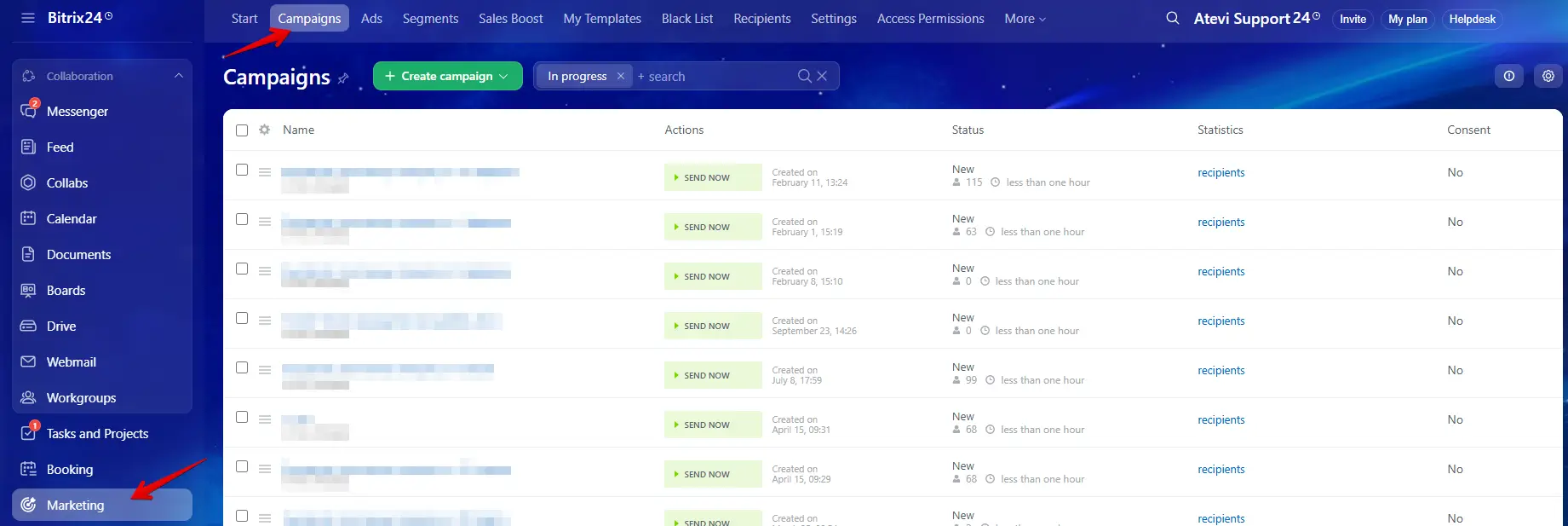
Many companies use Bitrix24 for their database but still use external tools like Mailchimp for emails. This creates a disconnect. You have to export client lists, upload them to another system, and then try to figure out who clicked what.
The main advantage of using Bitrix24 for email marketing is data integration. Because your emails are sent from the same place your customer data lives, you can target people based on their real-time behavior (e.g., "Send this to everyone who requested a quote yesterday").
To succeed, you need to configure six specific areas. Here is a detailed explanation of each step.
The Technical Foundation
If you skip this step, your emails will likely go to the Spam folder. You cannot simply start sending thousands of emails without configuring your domain first.
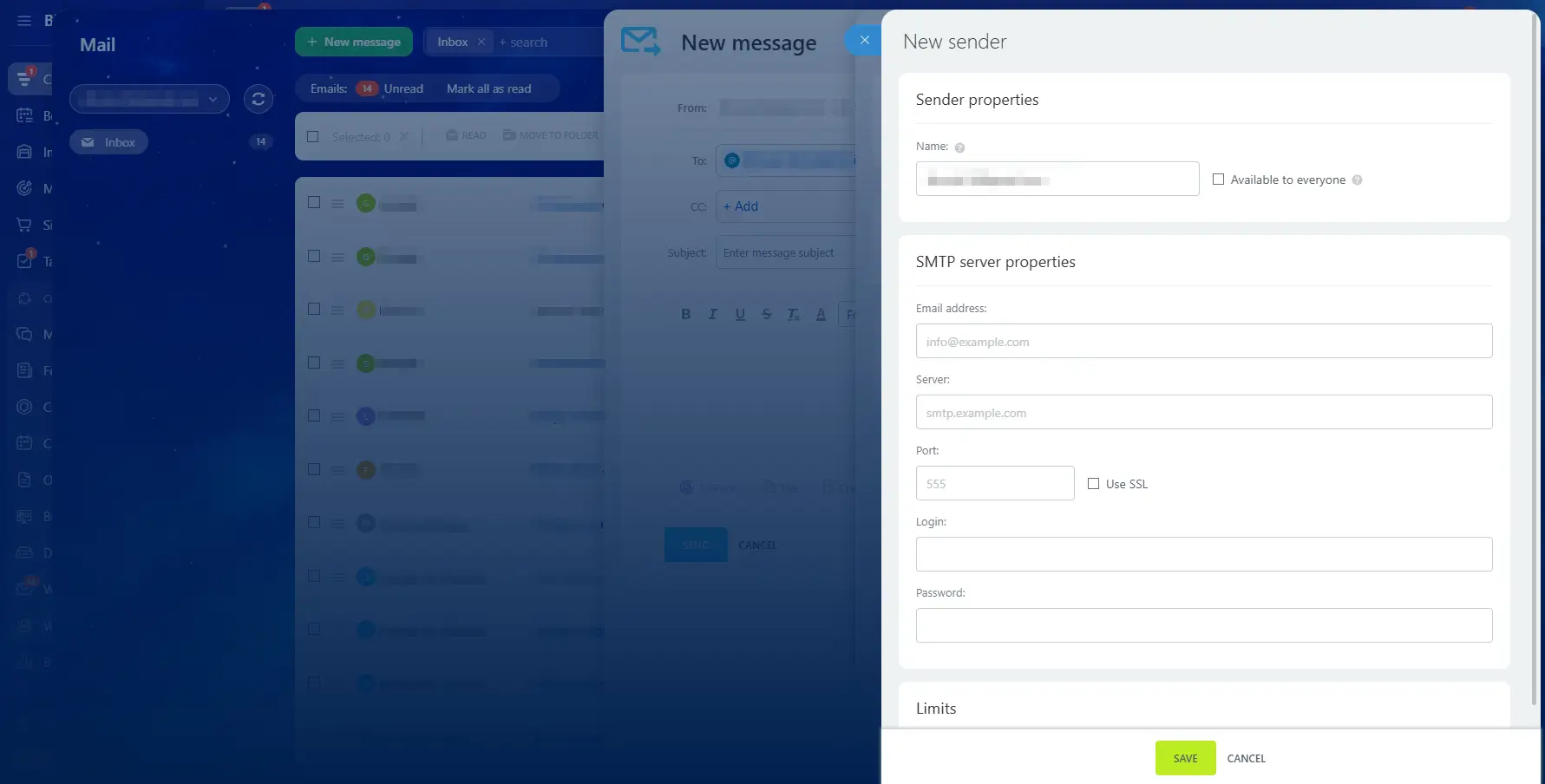
SMTP Configuration (Sending Server)
Bitrix24 has its own built-in mail server. However, it is designed for standard daily communication, not bulk marketing. If you try to send 5,000 emails at once using the standard Bitrix24 server, email providers (like Gmail or Outlook) may flag your activity as suspicious because the volume is too high for a standard user.
The solution: connect an external SMTP provider. Services like SendGrid, Mailgun, or Amazon SES are designed specifically to handle high-volume email traffic. By integrating one of these into Bitrix24, you ensure that your emails are delivered reliably and do not get blocked by spam filters.
SMTP settings page
Domain Verification
To prevent fraud, email providers (Gmail, Yahoo, Outlook) verify the sender's identity. They look for two specific records in your website's settings:
SPF (Sender Policy Framework). Think of this as a guest list. It is a public TXT record that explicitly authorizes Bitrix24 servers to send emails on behalf of your domain.
DKIM (DomainKeys Identified Mail): an encryption standard that verifies message integrity.
Copy the unique keys generated by Bitrix24 and paste them into your domain host's DNS panel. Failure to publish these records results in "Soft Bounces" or immediate rejection by receiving servers.
Sending Limits
Cloud Version: bitrix24 limits how many emails you can send per day to prevent spamming. This limit starts low. As you send emails that people open (and don't mark as spam), Bitrix24 gradually increases your daily limit.
On-Premise Version: there are no limits imposed by Bitrix24. Your limits depend entirely on your own server hardware and your SMTP provider.
The Audience (Segmentation)
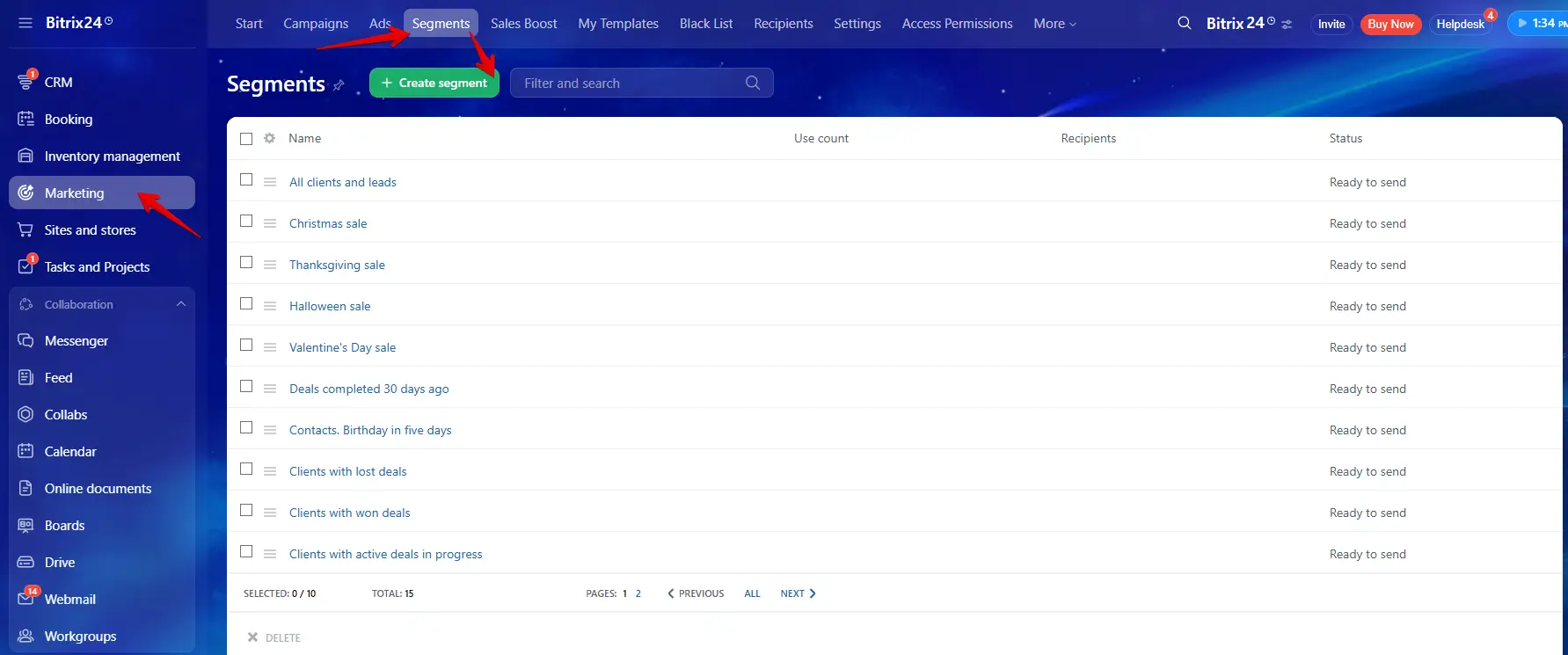
In Bitrix24, you do not just create "Lists." You create "Segments" based on data in your CRM.
Static vs. Dynamic Segments
Static List is a fixed list of email addresses. It does not change unless you manually add or remove people.
Dynamic Segment is a saved search filter. For example, you can create a segment for "All Leads with Status: In Progress."
Why this is useful? If a new Lead is added to the CRM tomorrow, they are automatically added to this segment. You do not need to update the list manually.
Segment constructor
Advanced Data Filtering
Since the marketing module is fused with your CRM, you aren't limited to basic demographics. You can drill down into behavioral data.
Example. You can target "All Contacts who spent more than $500 last year but have not purchased anything in the last 3 months." This creates a "Reactivation List." These people already trust you; they just need a nudge. This segment always outperforms cold traffic.
Exclusion Lists
You must also configure who should not receive emails. You can create a segment of clients who have open complaints or unpaid invoices and add them to the "Exceptions" list. Bitrix24 will automatically skip these people, even if they are in your main list.
Legal Compliance & The "Consent" Module
In addition to excluding specific clients, you must comply with laws like GDPR (Europe) or CAN-SPAM (USA). Bitrix24 handles this with two built-in features:
Mandatory Unsubscribe Link. Bitrix24 enforces email compliance at the system level. The software physically prevents you from launching a campaign without an opt-out mechanism. Even if you manually delete the "Unsubscribe" block from your visual editor to make the email look personal, the system will detect the missing code and force-append a standard footer. This isn't a bug; it is a safeguard to prevent providers from blacklisting your domain.
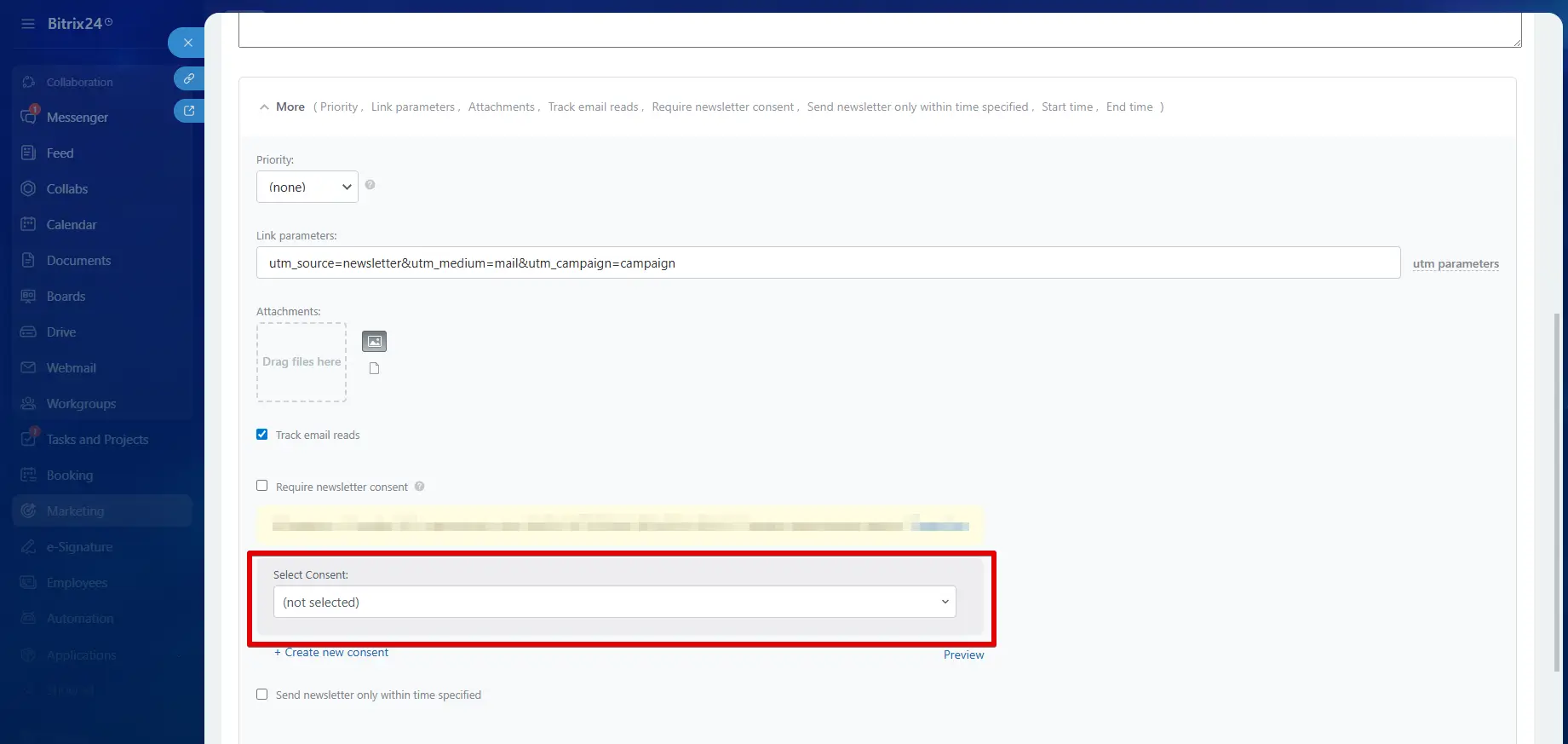
Consent Registry. Bitrix24 has a specific module called "Consent to Receive Newsletters." If a client fills out a CRM form on your website, Bitrix24 records the exact time and IP address where they agreed to receive emails. This digital log protects your company in case of a spam complaint or audit.
Consent module
Content Creation (The Visual Builder)
The Block Editor
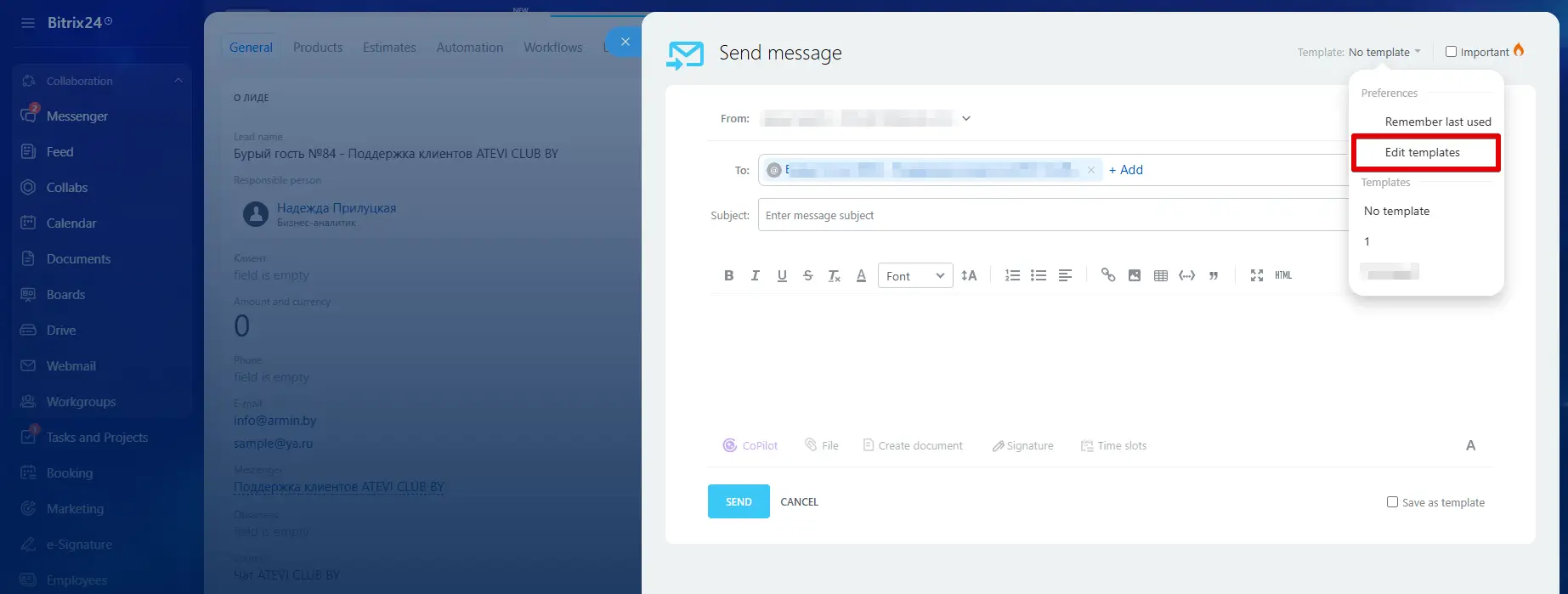
Bitrix24 uses a visual editor where you build emails by stacking "blocks." You do not need to know HTML code. You simply drag a "Text Block," "Image Block," or "Button Block" into the email area.
Email constructor
Recommendation: create one "Master Template" that contains your company logo at the top and your social media links and unsubscribe link at the bottom. Save this as a template. For every new campaign, simply load this template and change the middle text.
Smart Personalization (Macros)
Personalization increases open rates. Bitrix24 uses "Macros" (placeholders) to insert real data from the CRM into the email text.
Basic: Hi #NAME# becomes "Hi Steve".
Advanced: Regarding your deal #DEAL_TITLE# for #OPPORTUNITY#... becomes "Regarding your deal Software License for $500..."
This proves to the client that you know who they are and what they are interested in.
UTM Parameters for Tracking
Inside the email builder, there is a setting to enable UTM parameters. This automatically adds a tracking code to every link in your email. This allows you to open Google Analytics on your website and see exactly how many people visited your site coming specifically from this email campaign.
Execution (Two Methods of Sending)
Before you launch any campaign, you must control who holds the keys. Email marketing involves your entire client database, and you do not want every employee to have full access. In the CRM Marketing settings, you can configure strict permissions:
Segregation of Duties. You can allow junior staff to Create and Edit email templates, but restrict the Send button to managers only. This prevents accidental mass emails (like sending an unfinished draft to 15,000 people).
Data Protection. You can disable the Export button for specific roles. This prevents employees from downloading and stealing your client list.
There are two different ways to send emails in Bitrix24. You must choose the right one for your goal.
Use this module when you want to send the same email to many people at the same time.
Use Cases: monthly newsletters, holiday sales, product announcements.
Function: you select a Segment, design the email, and choose a time to send (e.g., "Send next Tuesday at 9:00 AM").
Method 2: Automation Rules (Trigger-Based)
Use this method when you want to send one email to one person based on their action.
Use Cases: welcome emails, payment confirmations, appointment reminders.
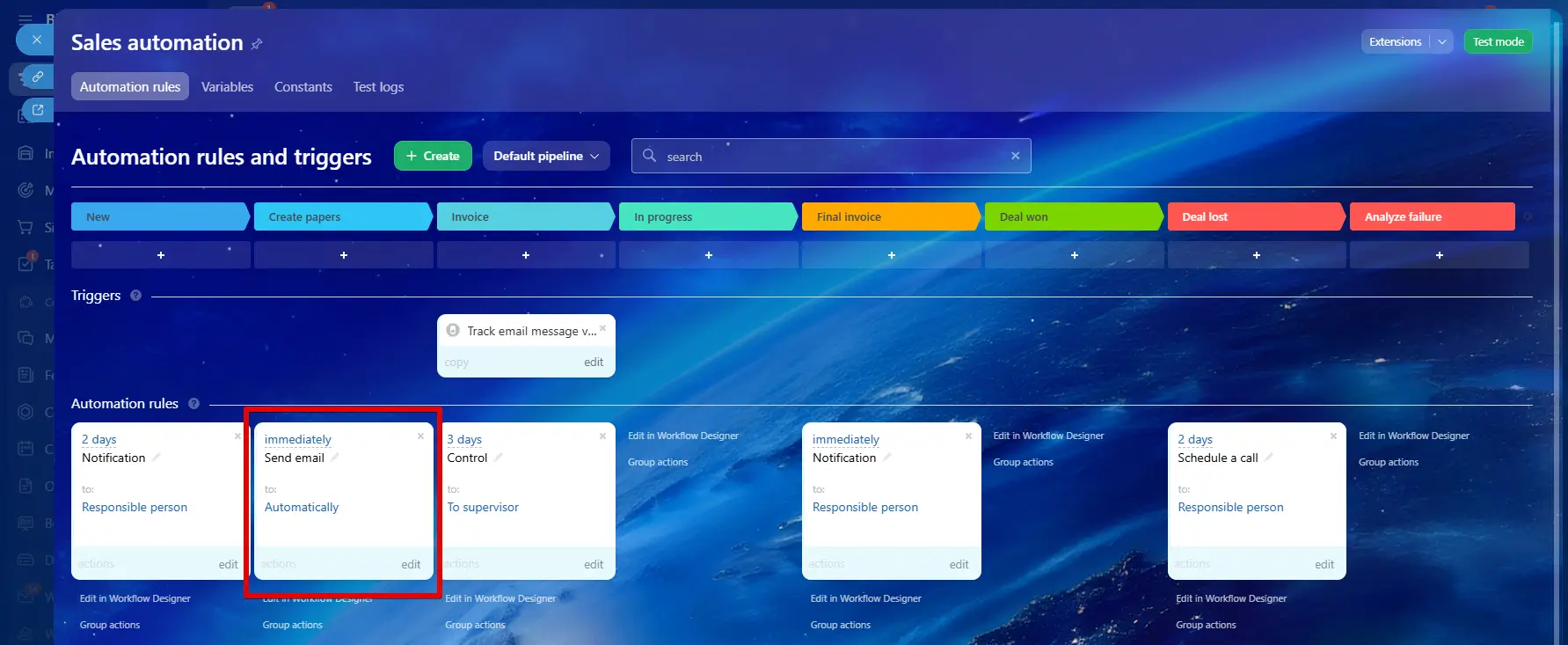
Function: you go to the Automation rules in your CRM pipeline. You set a rule: "When a Deal moves to 'Invoice Sent' stage, wait 15 minutes, then send 'Payment Instructions' email."
This happens automatically in the background for every individual client.
Automation rules (based on triggers)
Analytics and Sales Integration
Reading the Metrics
After sending a campaign, Bitrix24 provides a report:
Sent: the total number of emails that left the server.
Viewed: the number of people who opened the email.
Clicked: the number of people who clicked a link.
Bounced: emails that could not be delivered (e.g., the email address no longer exists).
Note: you should remove bounced emails from your CRM to keep your data clean.
Email company report
The "Sales Boost" (Click Processing)
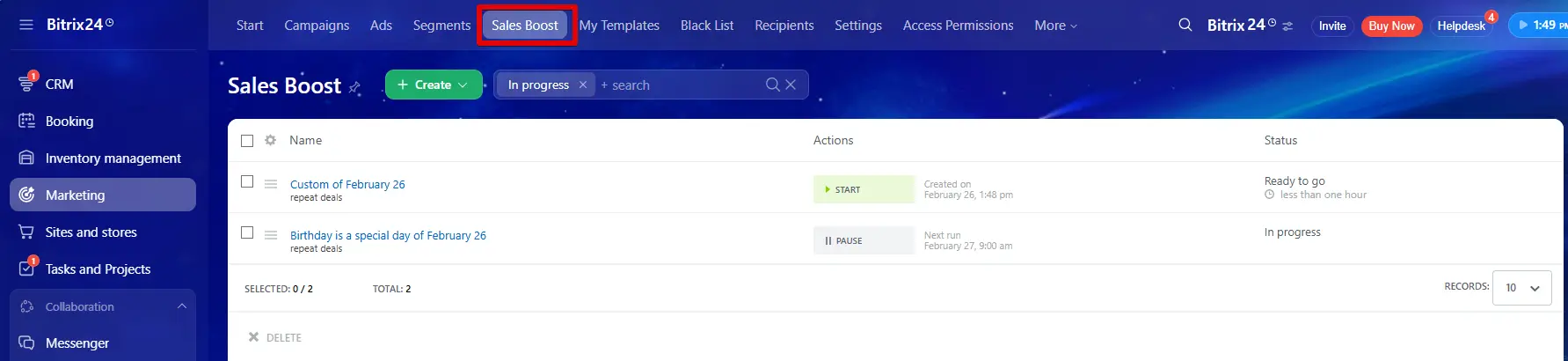
This is a unique feature in Bitrix24. It allows you to trigger a sales action immediately when a customer clicks a link in your email.
How it works:
You send an email with a link saying "Click here for a discount."
You configure the "Sales Boost" setting to monitor that specific link.
When a client clicks it, the system automatically creates a Task for your sales manager or creates a new Lead.
This converts a marketing view into an immediate sales task, ensuring the sales team calls the client while they are still looking at your offer.
Sales Boost
Conclusion
Bitrix24 email marketing allows you to move beyond simple "mass mailing." It allows you to send targeted messages based on client data and automate your follow-up process.
Your Action Plan:
Technical. Verify your domain (SPF/DKIM) to ensure delivery.
Data. Create a Dynamic Segment based on your current active clients.
Automation. Set up one simple email automation rule (like a "Welcome" email) to save time immediately.
Frequently Asked Questions
Why should I switch from Mailchimp to Bitrix24 if Mailchimp is easier to design?
The
main advantage is Data Integration. In Mailchimp, you have to manually export
and import lists every time you want to send a campaign. In Bitrix24, your
email list is your live CRM database. You can trigger emails based on real-time
events (like a deal stage change or a phone call result) without moving data
between systems.
What is the daily sending limit?
Cloud Version: Bitrix24 protects its servers by starting you with a low daily limit (e.g., 1,000 emails/day). If you send high-quality emails with low spam complaints, this limit automatically increases over time.
On-Premise Version: There are no software limits. You are limited only by your own server hardware and your SMTP provider's rules.
How do I stop employees from stealing my client list via the email tool?
You must configure Access Permissions in the CRM Marketing settings. You can disable the "Export" function for specific roles (like Junior Managers) so they can create and send campaigns but cannot download the database to an Excel file.
Do I need to know HTML to design emails?
No. Bitrix24 uses a Drag-and-Drop Block Editor. You simply drag image, text, and button blocks into place. However, if you have a custom HTML template designed by a professional agency, you can import the raw HTML code if you prefer.
My emails are going to the Spam folder. What is wrong?
This is almost always due to Domain Verification. You must configure your SPF and DKIM records in your DNS settings. Without these, email providers cannot verify that you are who you say you are. Secondly, if you are sending bulk emails, you must use an external SMTP provider instead of Bitrix24’s internal server.
Related articles
26.02.2026
Bitrix24 Email Marketing
Bitrix24 combines your customer database and email marketing, eliminating the need for fragmented tools. This data integration allows you to send personalized emails based on real-time customer behavior. The platform offers two sending methods: bulk campaigns via "CRM Marketing" and automated trigger-based emails.
In this article, we will examine the free version of Bitrix24 and its tools: CRM, tasks, internal communications, and web tools. We will analyze the platform's free capabilities and the limitations you might encounter.