Bitrix24 BI

Every company holds a vast amount of data, and your business effectiveness depends on your ability to work with it. Business Intelligence (BI) analytics makes it possible to consolidate disparate data and present it in a format that is clear and actionable for business. One of the key advantages of using Bitrix24 CRM is its powerful built-in BI analytics system.
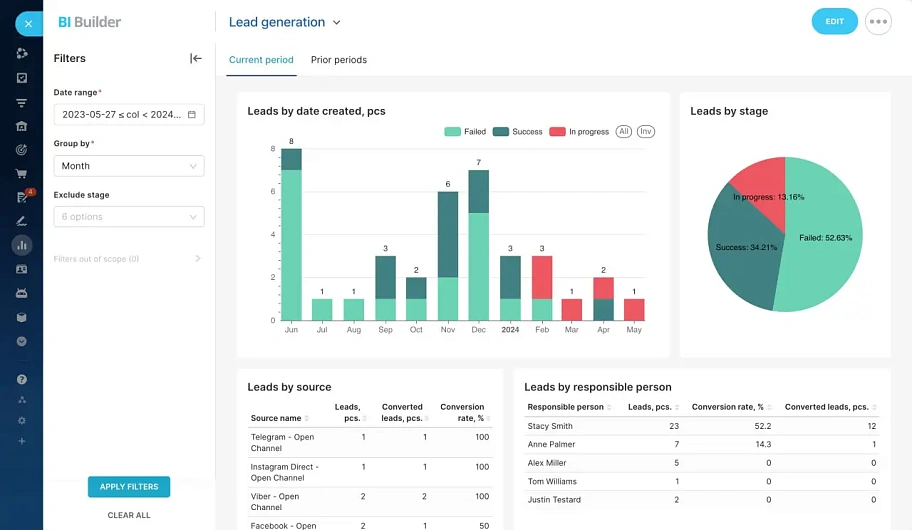
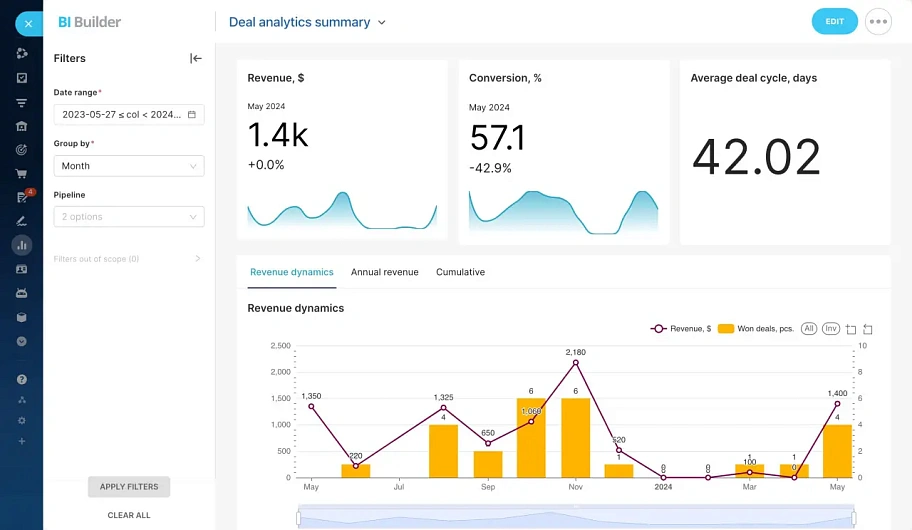
Bitrix24 comes with a powerful built-in Business Intelligence (BI) analytics tool. Use clear, operational reports directly in your CRM:
  • No integration setup required
  • No need to purchase additional licenses
  • Centralized management
  • Security and access rights
  • Wide range of ready-made datasets
  • Visualization and flexibility
Examples of standard reports in Bitrix24's built-in BI analytics
image
Lead Generation Analysis in CRM Bitrix24
image
Deal Analysis in CRM Bitrix24
image
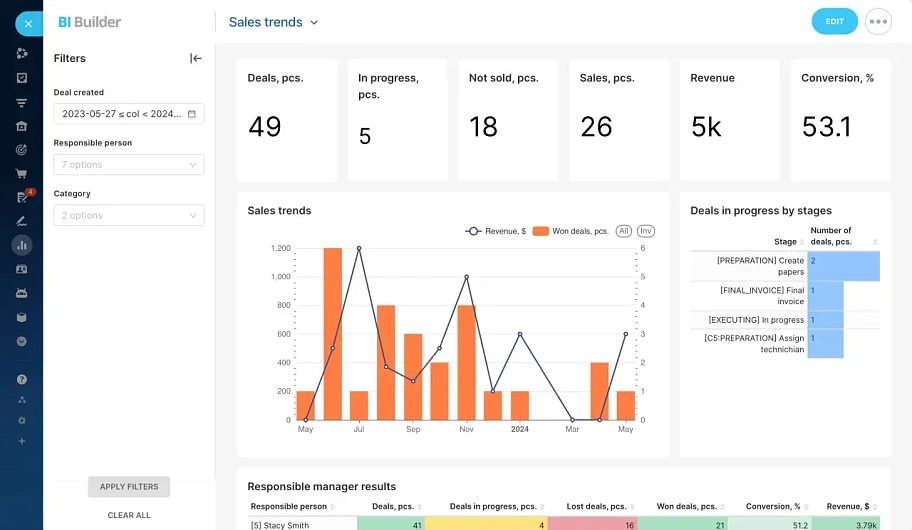
Sales Trend Analysis in CRM Bitrix24
image
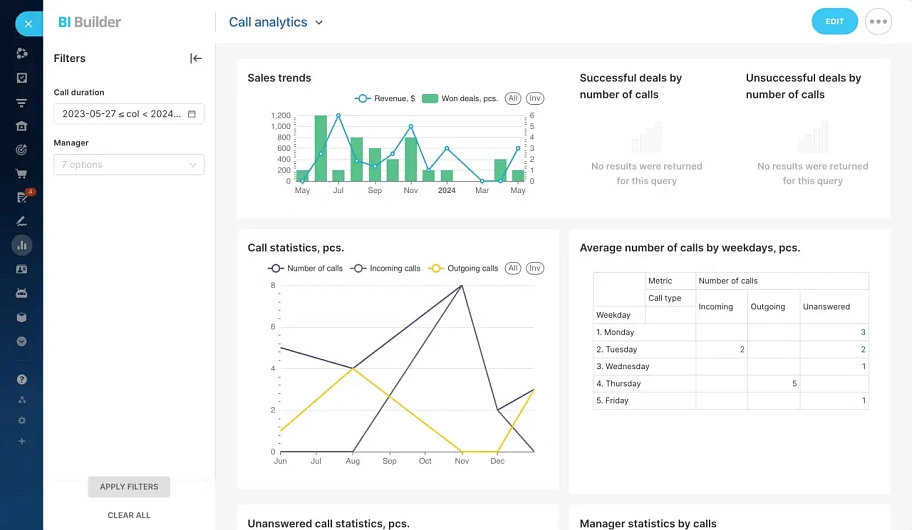
Call Analytics in CRM Bitrix24
image
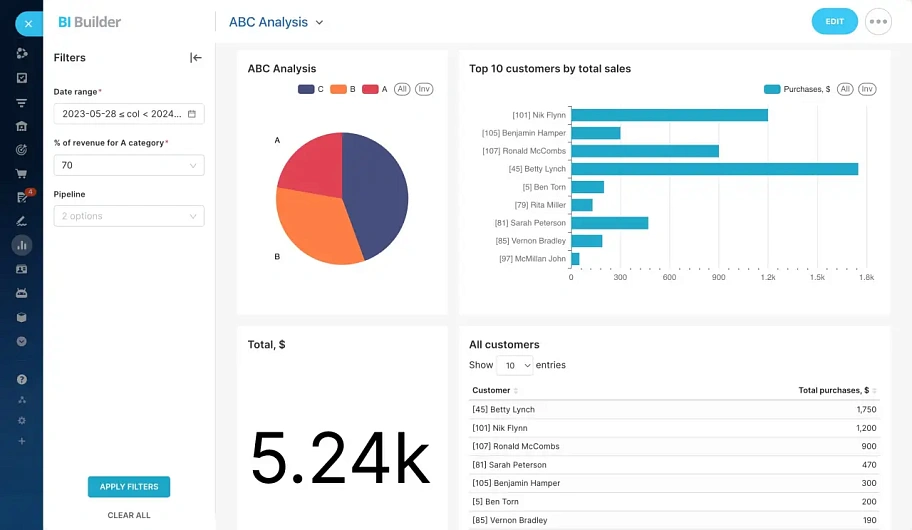
Customer ABC Analysis in CRM Bitrix24
image
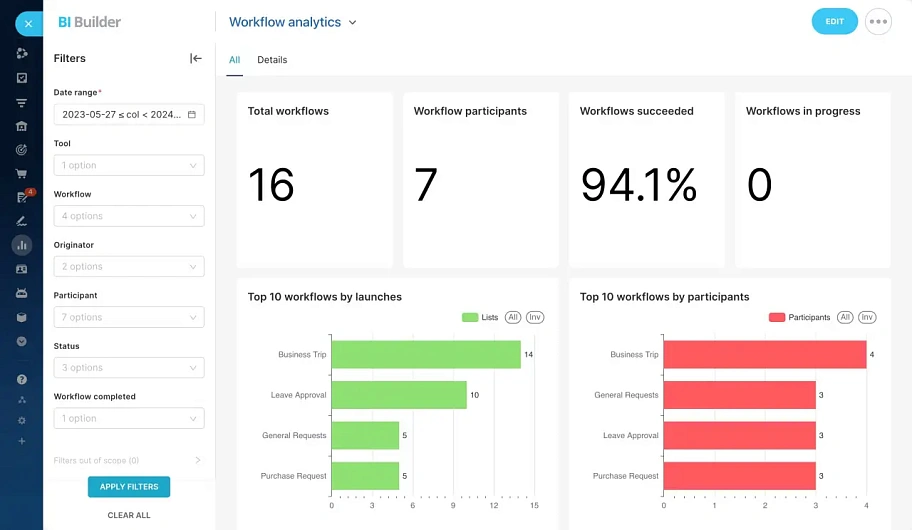
Workflow Analysis in Bitrix24

BI analytics will help solve the
following tasks for your business:

crm
Automation of data
analytics
  • Consolidating all data sources into one system
  • Regular automatic report generation
  • Automatic creation of pivot tables
  • Creation of visual dashboards
  • Flexible configuration of access rights
collaboration
Support for business decision-making
  • Monitoring the company's main KPIs
  • Monitoring KPIs for each company department
  • Profitability analysis by business line
  • Plan fulfillment analysis
  • Data preparation for strategic sessions
video call
Analysis of Company
Business Processes
  • Marketing effectiveness analysis
  • Identifying bottlenecks in sales
  • Identifying bottlenecks in logistics
  • Production cycle analysis
  • Discovering insights and trends

Why order Bitrix24 implementation from ATEVI?

icon
Bitrix24 platinum partners in Europe

The highest possible partner status

icon
16 years of experience with Bitrix24

All our projects are based exclusively on Bitrix products

icon
Strong team of Bitrix24 developers

12 certified developers

icon
Extensive Experience with Enterprise Clients

icon
VoIP Telephony Integration Expertise

Extensive experience in developing telephony integration solutions

Stages of Work
for BI Analytics Implementation
1
Business analysis

An online meeting with an experienced business analyst to define the project's goals and objectives, identify the data that will form the basis of the analytics, and determine the necessary dashboards.

2
Technical Specifications Development

Creation of a detailed document—the technical specifications—that thoroughly describes the Bitrix24 data on which the BI analytics will be built, along with a detailed description of all reports and dashboards.

3
Bitrix24 Configuration and Data Preparation

Execution of work to implement and configure Bitrix24 functionality that will serve as the foundation for building data in BI analytics. This can include both standard Bitrix24 features and the development of new custom functionality.

4
Power BI Reports and Dashboards Configuration

Development of reports and dashboards according to the agreed-upon technical specifications. This may involve customizing standard dashboards or creating reports and dashboards completely from scratch, including: developing the data model, writing scripts, creating new datasets, and data visualization.

5
Training on Working with Analytics

Conducting online training on how to work with the configured BI analytics.

6
Post-Launch Support

We provide 14 days of free support after the project launch to assist you and answer any questions that arise. Further support is provided under the terms of an SLA.

Frequently asked questions

faq
Which specific BI analytics engine is built into Bitrix24?

The built-in BI analytics in Bitrix24 operates on the Apache Superset 4.0 platform. This is a modern, secure, open-source platform for data exploration and visualization.

What tools are built into the BI analytics functionality in Bitrix24?

BI analytics is a comprehensive set of tools for professional data analysis. Bitrix24's BI analytics includes: a BI report builder, dashboards, and a BI connector (a tool for importing data from external systems).

Is it necessary to pay extra for a BI analytics license in Bitrix24?

No, no additional payment is required. This functionality is already included in the cost of all commercial Bitrix24 plans. The BI analytics module is not available on the free Bitrix24 plan.

Can external data sources be connected to Bitrix24 BI?

Yes, of course. You can connect external data sources to Bitrix24's BI analytics, such as: external SQL databases, data from CSV files, data from Google Spreadsheets, data from advertising accounts like Google Ads and Facebook Ads, as well as integration through third-party applications from the Bitrix24 marketplace.

What is the difference between CRM analytics and BI analytics?

Bitrix24 CRM analytics is a set of standard CRM reports without customization options. Bitrix24 BI analytics is a powerful functionality for building professional analytics not only based on CRM data, but on data from any part of Bitrix24, created and adapted directly to your business tasks using non-standard dashboards.

Does BI analytics work in the on-premise version?

Yes, it works, but it is important that your Bitrix24 on-premise license is active. The BI analytics module is not deployed locally on your server, but is loaded from Bitrix24's cloud services. Therefore, for the BI analytics module to function, your on-premise Bitrix24 will require an internet connection.

How quickly can BI analytics be implemented to see results?

The timeframe for a project to configure and implement BI analytics depends on your specific tasks. On average, such projects typically take 1-2 months.

How much does it cost to implement Bitrix24 BI analytics?

We'll provide a free consultation on BI analytics implementation

What else can we offer?
rework

customization of your on-premise Bitrix24, including application development

rework

customization of your Bitrix24's standard functionality to meet your business needs

support

providing continuous support and development of your Bitrix24 functionality

ip

delivery and configuration of the Yeastar IP PBX integration module for Bitrix24

Search
We use cookies to make the site more convenient

For the correct operation of the site, improving its usability and protecting your personal data, we use cookies. Read the Privacy Policy

Configure cookies

<  Back
Cookie settings

Technical (mandatory) cookies are necessary for the correct functioning of the site and cannot be disabled. You can configure your browser to block these cookies or notify you of their use, but in this case, some sections of the site may not work.

Analytical cookies are used to evaluate user behavior on the site. These cookies help understand how the site is used in order to increase its performance and make the site's functionality as convenient as possible for users. Advertising (marketing) cookies are used for marketing purposes and to improve the quality of advertising. These cookies help ensure the highest possible accuracy and value of marketing and advertising content for site users.

Read the Privacy Policy

Log in

Don't have an account?
Register

Password reset

The control word for changing the password, as well as your registration data, will be sent to you by email.