Bitrix24 BI

Each company contains a huge amount of data, and the effectiveness of your business depends on the ability to work with this data. Business Intelligence (BI) analytics makes it possible to consolidate disparate data and present it in a format that is understandable for business. One of the advantages of using the CRM Bitrix24 is its built-in, powerful BI analytics system.
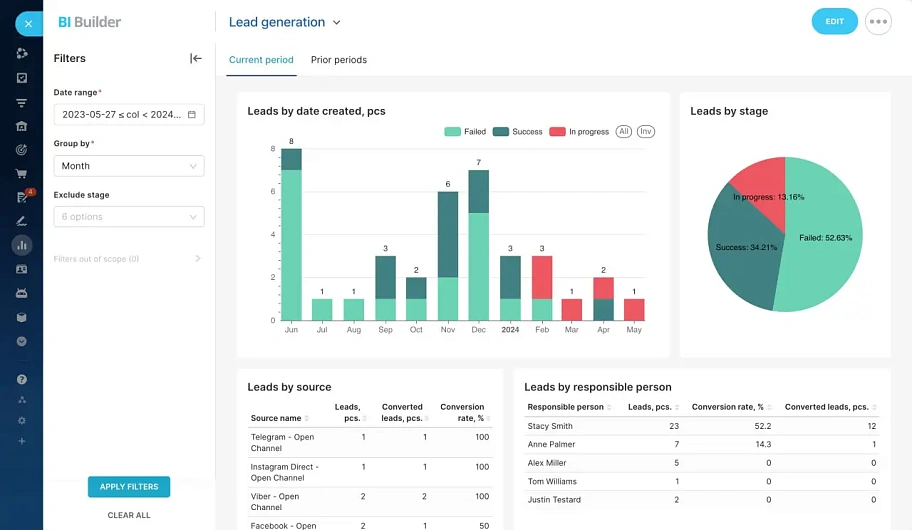
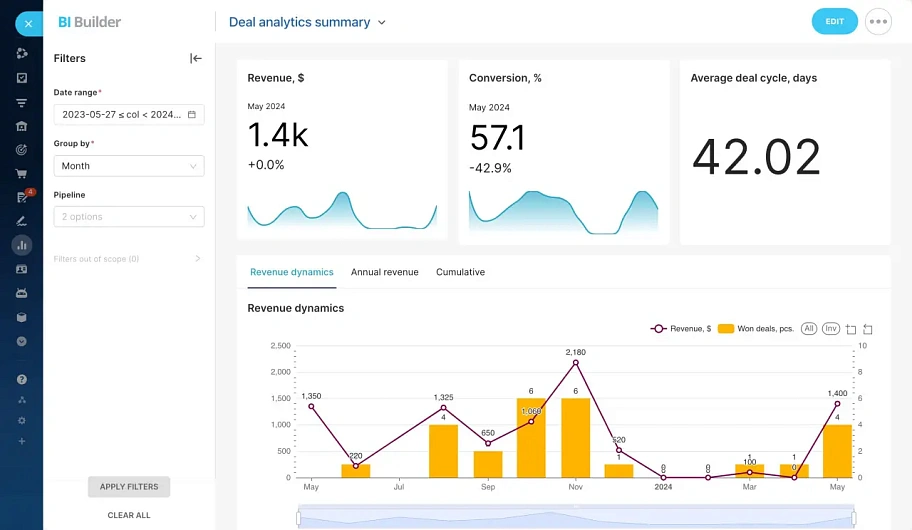
Bitrix24 has a built-in, powerful Business Intelligence (BI) analytics tool. Use clear, operational reports directly in your CRM
  • No integration setup required
  • No need to purchase additional licenses
  • Centralized management
  • Security and access rights
  • Wide range of ready-made datasets
  • Visualization and flexibility
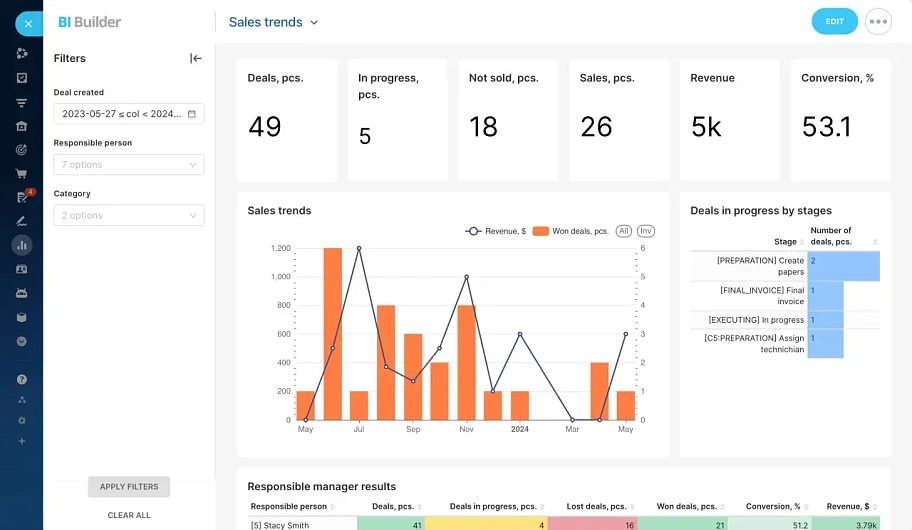
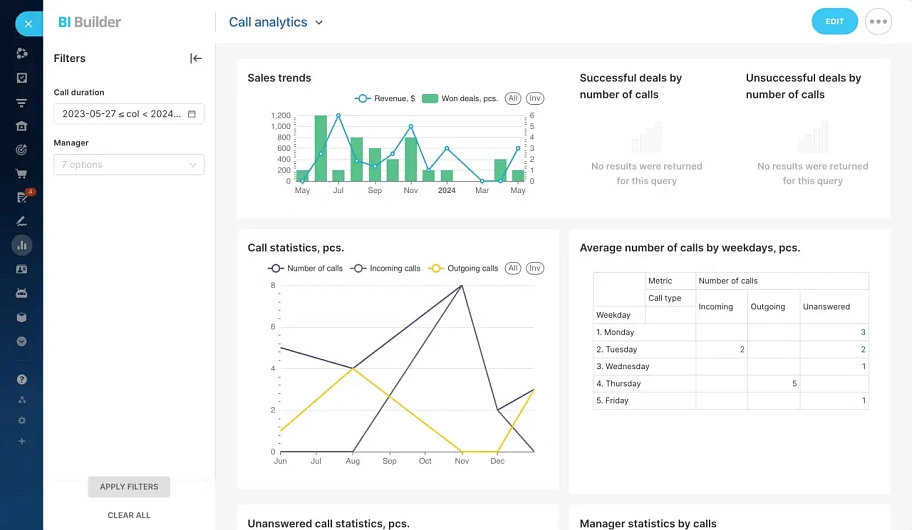
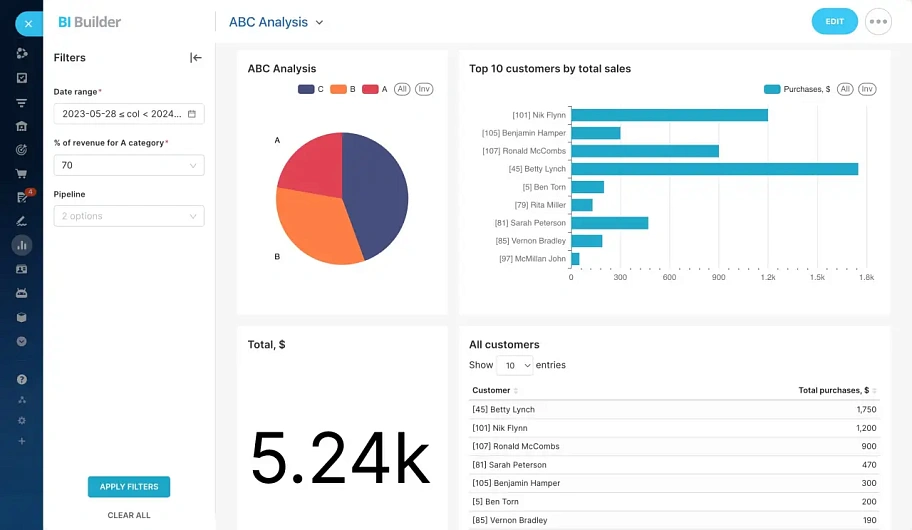
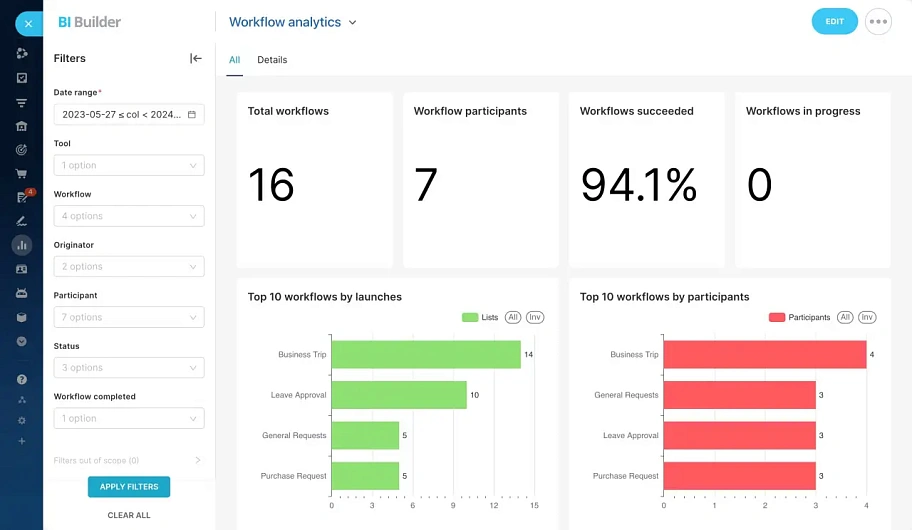
Examples of standard reports in Bitrix24's built-in BI analytics
image
Lead Generation Analysis
image
Deal Analysis
image
Sales Trend Analysis
image
Call Analytics
image
Customer ABC Analysis
image
Workflow Analysis

BI analytics will help solve the following tasks for your business:

crm
Automation of Data Analytics Work
  • Connecting all data sources into a unified system
  • Regular automatic report generation
  • Automatic creation of pivot tables
  • Creation of visual dashboards with various views
  • Flexible configuration of access rights to analytics
collaboration
Support for Company Business Decisions
  • Monitoring the company's main KPIs
  • Monitoring KPIs for each company department
  • Profitability analysis by business line
  • Analysis of plan fulfillment
  • Data preparation for strategic sessions
video call
Analysis of Company Business Processes
  • Analysis of marketing effectiveness
  • Identifying bottlenecks in sales
  • Identifying bottlenecks in logistics
  • Analysis of production cycles
  • Discovery of insights and trends

Why order Bitrix24 implementation from ATEVI?

icon
Bitrix24 platinum partners in Europe

the highest possible partner status

icon
16 years of experience with Bitrix24

All our projects are based on Bitrix products exclusively

icon
Strong team of Bitrix24 developers

12 certified programmers

icon
Extensive experience working with big clients

icon
Experience in integrating VoIP telephony

Extensive experience in developing telephony integration solutions

Stages of Work
for BI Analytics Implementation
1
Business analysis

An online meeting with an experienced business analyst to define the project's goals and objectives, identify the data that will form the basis of the analytics, and determine the necessary dashboards.

2
Development of Technical Specifications

Creation of a detailed document—the technical specifications—that thoroughly describes the Bitrix24 data on which the BI analytics will be built, along with a detailed description of all reports and dashboards.

3
Bitrix24 Configuration and Data Preparation

Execution of work to implement and configure Bitrix24 functionality that will serve as the foundation for building data in BI analytics. This can include both standard Bitrix24 features and the development of new custom functionality.

4
Configuration of BI Analytics Reports and Dashboards

Development of reports and dashboards according to the agreed-upon technical specifications. This may involve customizing standard dashboards or creating reports and dashboards completely from scratch, including: developing the data model, writing scripts, creating new datasets, and data visualization.

5
Training on Working with Analytics

Conducting online training on how to work with the configured BI analytics.

6
Post-Launch Support

For 14 days after the project launch, we will provide free support to assist you and answer any questions that arise. Further support is provided under the terms of an SLA.

Frequently asked questions

faq
Which specific BI analytics engine is built into Bitrix24?

The built-in BI analytics in Bitrix24 operates on the Apache Superset 4.0 platform. This is a modern, secure, open-source platform for data exploration and visualization.

What tools are built into the BI analytics functionality in Bitrix24?

BI analytics is a comprehensive set of tools for professional data analysis. Bitrix24's BI analytics includes: a BI report builder, dashboards, and a BI connector (a tool for importing data from external systems).

Is it necessary to pay extra for a BI analytics license in Bitrix24?

No, no additional payment is required. This functionality is already included in the cost of all commercial Bitrix24 plans. The BI analytics module is not available on the free Bitrix24 plan.

Can external data sources be connected?

Yes, of course. You can connect external data sources to Bitrix24's BI analytics, such as: external SQL databases, data from CSV files, data from Google Spreadsheets, data from advertising accounts like Google Ads and Facebook Ads, as well as integration through third-party applications from the Bitrix24 marketplace.

What is the difference between CRM analytics and BI analytics?

Bitrix24 CRM analytics is a set of standard CRM reports without customization options. Bitrix24 BI analytics is a powerful functionality for building professional analytics not only based on CRM data, but on data from any part of Bitrix24, created and adapted directly to your business tasks using non-standard dashboards.

Does BI analytics work in the on-premise version?

Yes, it works, but it is important that your Bitrix24 on-premise license is active. The BI analytics module is not deployed locally on your server, but is loaded from Bitrix24's cloud services. Therefore, for the BI analytics module to function, your on-premise Bitrix24 will require an internet connection.

How quickly can BI analytics be implemented to see results?

The timeframe for a project to configure and implement BI analytics depends on your specific tasks. On average, such projects typically take 1-2 months.

How much does it cost to implement Bitrix24 BI analytics?

We will provide you with a free consultation on BI analytics implementation

What else can we offer?
rework

any customisation of your Bitrix24 on-premise version, as well as application development

rework

customisation of regular functionality of your Bitrix24 to satisfy the needs of your business

support

providing continuous support and development of your Bitrix24 functionality

ip

delivery and configuration of Yeastar IP PBX integration module with Bitrix24

Search

This website uses cookies to understand how you use it, to personalize content and improve your experience. By continuing to use our website, you confirm your consent to our use of cookies and to improve.

Log in

Don't have an account?
Register

Password reset

The control word for changing the password, as well as your registration data, will be sent to you by email.